

저번 시간에 만들었던 portainer를 보니 이거 CPU나 RAM 같은 정보는 보여주지만 GPU 지표는 보여주지 않는다.
GPU 지표를 보기위해 NVIDIA DCGM Exporter를 도입하기로 했다.
https://docs.nvidia.com/datacenter/dcgm/latest/gpu-telemetry/dcgm-exporter.html
DCGM-Exporter — NVIDIA DCGM Documentation latest documentation
In this scenario the DCGM nv-hostengine runs in a separate container on the same host making its client port available to DCGM-Exporter as well as dcgmi client commands. Warning Similar to the warning when connecting to an existing DCGM agent, the dcgm-exp
docs.nvidia.com
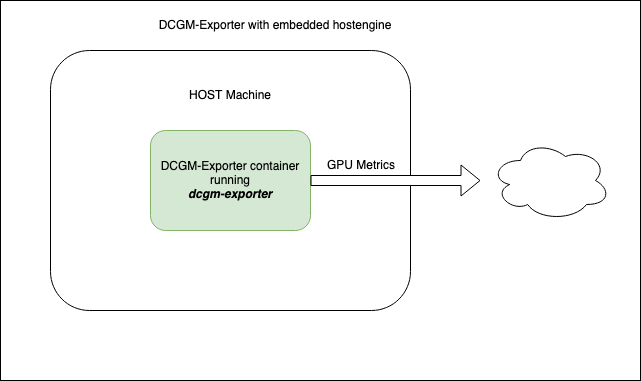
DCGM이란 Data Center Gpu Manager의 약자로 대규모 GPU 서버 환경에서 GPU 상태와 성능을 모니터링할 수 있는 도구이다.
그런데 DCGM Exporter만 띄운다고 끝이 아니다. Exporter는 메트릭을 노출만 할 뿐, 이걸 수집하고 시각화하는 도구가 따로 필요하다. 그래서 Prometheus + Grafana 조합을 함께 구축하기로 했다.
추가로 node-exporter와 kube-state-metrics를 함께 배포해서 노드 시스템 Metric과 Kubernetes 오브젝트 Metric까지 한꺼번에 수집하도록 구성했다.
전체 아키텍처
구성은 크게 세 영역으로 나뉜다.
- Host — NVIDIA GPU가 장착된 물리 서버
- k3s 클러스터 — Kubernetes 런타임 환경. 이 안에 monitoring 네임스페이스를 만들어 모니터링 관련 리소스를 격리한다.
- monitoring 네임스페이스 — Metric 수집기들이 실제로 동작하는 공간이다. DCGM Exporter(GPU), node-exporter(노드 시스템), kube-state-metrics(K8s 오브젝트) 세 가지 Exporter가 각자 담당 영역의 메트릭을 수집해서 엔드포인트로 노출한다. ConfigMap으로 수집할 메트릭 항목을 설정하고, 각 Exporter가 이를 Prometheus가 읽을 수 있는 형식으로 변환해준다.
- 모니터링 도구 — Prometheus가 각 Exporter의 엔드포인트를 주기적으로 수집해서 시계열 데이터로 저장하고, Grafana가 이를 대시보드로 시각화한다.
흐름을 정리하면 다음과 같다.

파일 구조
monitoring 디렉토리 아래에 번호 순서대로 YAML 파일을 배치했다.
master/monitoring/
├── 1-namespace.yaml          # monitoring 네임스페이스
├── 2-dcgm-exporter.yaml      # GPU 메트릭 수집 (DaemonSet)
├── 3-prometheus.yaml          # 메트릭 수집/저장/쿼리
├── 4-prometheus-rbac.yaml     # Prometheus RBAC 설정
├── 5-node-exporter.yaml       # 노드 시스템 메트릭 (DaemonSet)
├── 6-grafana.yaml             # 시각화 대시보드
└── 7-kube-state-metrics.yaml  # K8s 오브젝트 메트릭
한 번에 적용하기 위해 아래 명령어를 사용했다.
sudo kubectl apply -f master/monitoring/이제 각 파일을 하나씩 살펴보자.
1. Namespace 생성
# 1-namespace.yaml
apiVersion: v1
kind: Namespace
metadata:
name: monitoring모든 모니터링 리소스를 monitoring 네임스페이스에 격리한다. 별도 네임스페이스를 만들면 나중에 리소스 정리가 편하다.
2. DCGM-Exporter (GPU 메트릭 수집)
# monitoring/2-dcgm-exporter.yaml
apiVersion: apps/v1
kind: DaemonSet
metadata:
  name: dcgm-exporter
  namespace: monitoring
  labels:
    app: dcgm-exporter
spec:
  updateStrategy:
    type: RollingUpdate
  selector:
    matchLabels:
      app: dcgm-exporter
  template:
    metadata:
      labels:
        app: dcgm-exporter
    spec:
      automountServiceAccountToken: false
      containers:
      - name: dcgm-exporter
        image: nvcr.io/nvidia/k8s/dcgm-exporter:4.5.2-4.8.1-distroless
        env:
        - name: DCGM_EXPORTER_LISTEN
          value: ":9400"
        - name: DCGM_EXPORTER_KUBERNETES
          value: "true"
        - name: NODE_NAME
          valueFrom:
            fieldRef:
              fieldPath: spec.nodeName
        ports:
        - name: metrics
          containerPort: 9400
        securityContext:
          runAsNonRoot: false
          runAsUser: 0
          capabilities:
            add: ["SYS_ADMIN"]
            drop: ["ALL"]
        volumeMounts:
        - name: pod-gpu-resources
          readOnly: true
          mountPath: /var/lib/kubelet/pod-resources
        resources:
          limits:
            cpu: 500m
            memory: 1Gi
          requests:
            cpu: 100m
            memory: 512Mi
      volumes:
      - name: pod-gpu-resources
        hostPath:
          path: /var/lib/kubelet/pod-resources
---
apiVersion: v1
kind: Service
metadata:
  name: dcgm-exporter
  namespace: monitoring
  labels:
    app: dcgm-exporter
spec:
  clusterIP: None
  selector:
    app: dcgm-exporter
  ports:
  - name: metrics
    port: 9400
    targetPort: 9400
이번 글의 핵심인 DCGM-Exporter다. DaemonSet과 Headless Service로 구성된다.
| 항목 | 값 |
| 이미지 | nvcr.io/nvidia/k8s/dcgm-exporter |
| 메트릭 포트 | 9400 |
| Service 타입 | Headless (clusterIP: None) |
3. Prometheus (메트릭 수집 & 저장)
# monitoring/3-prometheus.yaml
apiVersion: v1
kind: ConfigMap
metadata:
  name: prometheus-config
  namespace: monitoring
data:
  prometheus.yml: |
    global:
      scrape_interval: 15s

    scrape_configs:
      - job_name: 'dcgm-exporter'
        scrape_interval: 5s
        dns_sd_configs:
          - names:
              - 'dcgm-exporter.monitoring.svc.cluster.local'
            type: A
            port: 9400

      - job_name: 'kubernetes-cadvisor'
        scheme: https
        tls_config:
          ca_file: /var/run/secrets/kubernetes.io/serviceaccount/ca.crt
          insecure_skip_verify: true
        bearer_token_file: /var/run/secrets/kubernetes.io/serviceaccount/token
        kubernetes_sd_configs:
        - role: node
        relabel_configs:
        - action: labelmap
          regex: __meta_kubernetes_node_label_(.+)
        - target_label: __address__
          replacement: kubernetes.default.svc:443
        - source_labels: [__meta_kubernetes_node_name]
          regex: (.+)
          target_label: __metrics_path__
          replacement: /api/v1/nodes/${1}/proxy/metrics/cadvisor
        - source_labels: [__meta_kubernetes_node_name]
          target_label: node

      - job_name: 'node-exporter'
        kubernetes_sd_configs:
        - role: node
        relabel_configs:
        - action: labelmap
          regex: __meta_kubernetes_node_label_(.+)
        - source_labels: [__address__]
          regex: '(.*):10250'
          replacement: '${1}:9100'
          target_label: __address__
        - source_labels: [__meta_kubernetes_node_name]
          target_label: node
        metric_relabel_configs:
        - source_labels: [node]
          target_label: nodename

      - job_name: 'kube-state-metrics'
        static_configs:
        - targets: ['kube-state-metrics.monitoring.svc.cluster.local:8080']
---
apiVersion: apps/v1
kind: Deployment
metadata:
  name: prometheus
  namespace: monitoring
  labels:
    app: prometheus
spec:
  replicas: 1
  selector:
    matchLabels:
      app: prometheus
  template:
    metadata:
      labels:
        app: prometheus
    spec:
      serviceAccountName: prometheus
      nodeSelector:
        node-role.kubernetes.io/control-plane: "true"
      tolerations:
      - key: node-role.kubernetes.io/control-plane
        effect: NoSchedule
      containers:
      - name: prometheus
        image: prom/prometheus:v2.53.0
        args:
          - "--config.file=/etc/prometheus/prometheus.yml"
          - "--storage.tsdb.path=/prometheus"
          - "--storage.tsdb.retention.time=30d"
        ports:
        - containerPort: 9090
        volumeMounts:
        - name: config
          mountPath: /etc/prometheus
        - name: data
          mountPath: /prometheus
        resources:
          limits:
            cpu: 500m
            memory: 512Mi
          requests:
            cpu: 250m
            memory: 256Mi
      volumes:
      - name: config
        configMap:
          name: prometheus-config
      - name: data
        emptyDir: {}
---
apiVersion: v1
kind: Service
metadata:
  name: prometheus
  namespace: monitoring
spec:
  type: NodePort
  selector:
    app: prometheus
  ports:
  - port: 9090
    targetPort: 9090
    nodePort: 30001
Prometheus가 수집하는 대상은 총 4가지다.
| Job | 대상 | 수집 방식 |
| dcgm-exporter | GPU 메트릭 | DNS SD → 각 Pod IP:9400 |
| kubernetes-cadvisor | 컨테이너 CPU/메모리 | K8s SD (node) → kube-apiserver 프록시 |
| node-exporter | 노드 시스템 메트릭 | K8s SD (node) → 노드IP:9100 |
| kube-state-metrics | K8s 오브젝트 상태 | Static config → ClusterIP:8080 |
4. Prometheus RBAC
# 4-prometheus-rbac.yaml
apiVersion: v1
kind: ServiceAccount
metadata:
  name: prometheus
  namespace: monitoring
---
apiVersion: rbac.authorization.k8s.io/v1
kind: ClusterRole
metadata:
  name: prometheus
rules:
- apiGroups: [""]
  resources:
  - nodes
  - nodes/metrics
  - nodes/proxy
  - services
  - endpoints
  - pods
  verbs: ["get", "list", "watch"]
- nonResourceURLs: ["/metrics"]
  verbs: ["get"]
---
apiVersion: rbac.authorization.k8s.io/v1
kind: ClusterRoleBinding
metadata:
  name: prometheus
roleRef:
  apiGroup: rbac.authorization.k8s.io
  kind: ClusterRole
  name: prometheus
subjects:
- kind: ServiceAccount
  name: prometheus
  namespace: monitoring
Prometheus Pod가 Kubernetes API를 조회하려면 적절한 권한이 필요하다.
ServiceAccount, ClusterRole, ClusterRoleBinding 세 가지를 구성한다.
5. Node Exporter (노드 시스템 메트릭)
# monitoring/5-node-exporter.yaml
apiVersion: apps/v1
kind: DaemonSet
metadata:
  name: node-exporter
  namespace: monitoring
  labels:
    app: node-exporter
spec:
  selector:
    matchLabels:
      app: node-exporter
  template:
    metadata:
      labels:
        app: node-exporter
    spec:
      hostNetwork: true
      hostPID: true
      tolerations:
      - operator: Exists
      containers:
      - name: node-exporter
        image: prom/node-exporter:v1.8.1
        args:
        - --path.procfs=/host/proc
        - --path.sysfs=/host/sys
        - --path.rootfs=/host/root
        ports:
        - containerPort: 9100
          hostPort: 9100
          name: metrics
        resources:
          limits:
            cpu: 250m
            memory: 180Mi
          requests:
            cpu: 100m
            memory: 100Mi
        volumeMounts:
        - name: proc
          mountPath: /host/proc
          readOnly: true
        - name: sys
          mountPath: /host/sys
          readOnly: true
        - name: root
          mountPath: /host/root
          mountPropagation: HostToContainer
          readOnly: true
      volumes:
      - name: proc
        hostPath:
          path: /proc
      - name: sys
        hostPath:
          path: /sys
      - name: root
        hostPath:
          path: /
모든 노드의 CPU, 메모리, 디스크, 네트워크 등 OS 레벨 메트릭을 수집한다.
6. Grafana (시각화)
# monitoring/6-grafana.yaml
apiVersion: v1
kind: ConfigMap
metadata:
  name: grafana-dashboards-provider
  namespace: monitoring
data:
  dashboards.yaml: |
    apiVersion: 1
    providers:
      - name: default
        orgId: 1
        folder: ""
        type: file
        disableDeletion: false
        updateIntervalSeconds: 30
        options:
          path: /var/lib/grafana/dashboards
---
apiVersion: v1
kind: ConfigMap
metadata:
  name: grafana-datasources
  namespace: monitoring
data:
  datasources.yaml: |
    apiVersion: 1
    datasources:
      - name: Prometheus
        type: prometheus
        access: proxy
        url: http://prometheus.monitoring.svc.cluster.local:9090
        isDefault: true
---
apiVersion: apps/v1
kind: Deployment
metadata:
  name: grafana
  namespace: monitoring
  labels:
    app: grafana
spec:
  replicas: 1
  selector:
    matchLabels:
      app: grafana
  template:
    metadata:
      labels:
        app: grafana
    spec:
      nodeSelector:
        node-role.kubernetes.io/control-plane: "true"
      tolerations:
      - key: node-role.kubernetes.io/control-plane
        effect: NoSchedule
      containers:
      - name: grafana
        image: grafana/grafana:11.1.0
        env:
        - name: GF_SECURITY_ADMIN_USER
          value: "admin"
        - name: GF_SECURITY_ADMIN_PASSWORD
          value: "admin123"
        ports:
        - containerPort: 3000
        volumeMounts:
        - name: datasources
          mountPath: /etc/grafana/provisioning/datasources
        - name: dashboards-provider
          mountPath: /etc/grafana/provisioning/dashboards
        - name: data
          mountPath: /var/lib/grafana
        resources:
          limits:
            cpu: 500m
            memory: 512Mi
          requests:
            cpu: 250m
            memory: 256Mi
      volumes:
      - name: datasources
        configMap:
          name: grafana-datasources
      - name: dashboards-provider
        configMap:
          name: grafana-dashboards-provider
      - name: data
        emptyDir: {}
---
apiVersion: v1
kind: Service
metadata:
  name: grafana
  namespace: monitoring
spec:
  type: NodePort
  selector:
    app: grafana
  ports:
  - port: 3000
    targetPort: 3000
    nodePort: 30000
Prometheus에 쌓인 데이터를 대시보드로 보여주는 역할이다.
7. Kube-State-Metrics (K8s 오브젝트 메트릭)
# monitoring/7-kube-state-metrics.yaml
apiVersion: v1
kind: ServiceAccount
metadata:
  name: kube-state-metrics
  namespace: monitoring
---
apiVersion: rbac.authorization.k8s.io/v1
kind: ClusterRole
metadata:
  name: kube-state-metrics
rules:
- apiGroups: [""]
  resources:
  - nodes
  - pods
  - services
  - endpoints
  - namespaces
  - resourcequotas
  - replicationcontrollers
  - limitranges
  - persistentvolumes
  - persistentvolumeclaims
  - configmaps
  - secrets
  verbs: ["list", "watch"]
- apiGroups: ["apps"]
  resources:
  - deployments
  - replicasets
  - statefulsets
  - daemonsets
  verbs: ["list", "watch"]
- apiGroups: ["batch"]
  resources:
  - jobs
  - cronjobs
  verbs: ["list", "watch"]
- apiGroups: ["autoscaling"]
  resources:
  - horizontalpodautoscalers
  verbs: ["list", "watch"]
- apiGroups: ["policy"]
  resources:
  - poddisruptionbudgets
  verbs: ["list", "watch"]
- apiGroups: ["storage.k8s.io"]
  resources:
  - storageclasses
  - volumeattachments
  verbs: ["list", "watch"]
- apiGroups: ["networking.k8s.io"]
  resources:
  - ingresses
  - networkpolicies
  verbs: ["list", "watch"]
---
apiVersion: rbac.authorization.k8s.io/v1
kind: ClusterRoleBinding
metadata:
  name: kube-state-metrics
roleRef:
  apiGroup: rbac.authorization.k8s.io
  kind: ClusterRole
  name: kube-state-metrics
subjects:
- kind: ServiceAccount
  name: kube-state-metrics
  namespace: monitoring
---
apiVersion: apps/v1
kind: Deployment
metadata:
  name: kube-state-metrics
  namespace: monitoring
  labels:
    app: kube-state-metrics
spec:
  replicas: 1
  selector:
    matchLabels:
      app: kube-state-metrics
  template:
    metadata:
      labels:
        app: kube-state-metrics
    spec:
      serviceAccountName: kube-state-metrics
      nodeSelector:
        node-role.kubernetes.io/control-plane: "true"
      tolerations:
      - key: node-role.kubernetes.io/control-plane
        effect: NoSchedule
      containers:
      - name: kube-state-metrics
        image: registry.k8s.io/kube-state-metrics/kube-state-metrics:v2.13.0
        ports:
        - name: metrics
          containerPort: 8080
        - name: telemetry
          containerPort: 8081
        livenessProbe:
          httpGet:
            path: /healthz
            port: 8080
          initialDelaySeconds: 5
          timeoutSeconds: 5
        readinessProbe:
          httpGet:
            path: /
            port: 8081
          initialDelaySeconds: 5
          timeoutSeconds: 5
        resources:
          limits:
            cpu: 200m
            memory: 256Mi
          requests:
            cpu: 50m
            memory: 64Mi
---
apiVersion: v1
kind: Service
metadata:
  name: kube-state-metrics
  namespace: monitoring
  labels:
    app: kube-state-metrics
spec:
  type: ClusterIP
  selector:
    app: kube-state-metrics
  ports:
  - name: metrics
    port: 8080
    targetPort: 8080
  - name: telemetry
    port: 8081
    targetPort: 8081
node-exporter가 OS 레벨을 담당한다면, kube-state-metrics는 Kubernetes API 오브젝트 레벨을 담당한다.
파드가 모두 정상적으로 생성되었는지 확인해보자.
sudo kubectl get pods -n monitoring

NAME                                  READY   STATUS    RESTARTS   AGE
dcgm-exporter-sh4xv                   1/1     Running   0          19s
dcgm-exporter-xkljl                   1/1     Running   0          19s
grafana-9c7fb484d-htjk8               1/1     Running   0          19s
kube-state-metrics-7db5747d95-8plwq   1/1     Running   0          19s
node-exporter-pfmnf                   1/1     Running   0          19s
node-exporter-zp2mm                   1/1     Running   0          19s
prometheus-7d594696d7-4n4v4           1/1     Running   0          19s
DCGM Exporter의 엔드포인트 IP에 curl 명령어를 보내 정상적으로 연결되는지 확인해보았다.
sudo kubectl get endpoints dcgm-exporter -n monitoring

Warning: v1 Endpoints is deprecated in v1.33+; use discovery.k8s.io/v1 EndpointSlice
NAME            ENDPOINTS                         AGE
dcgm-exporter   10.42.0.64:9400,10.42.1.26:9400   29s

curl -v --max-time 3 http://10.42.0.64:9400/metrics

*   Trying 10.42.0.55:9400...
* Connected to 10.42.0.55 (10.42.0.55) port 9400
> GET /metrics HTTP/1.1
> Host: 10.42.0.55:9400
> User-Agent: curl/8.5.0
> Accept: */*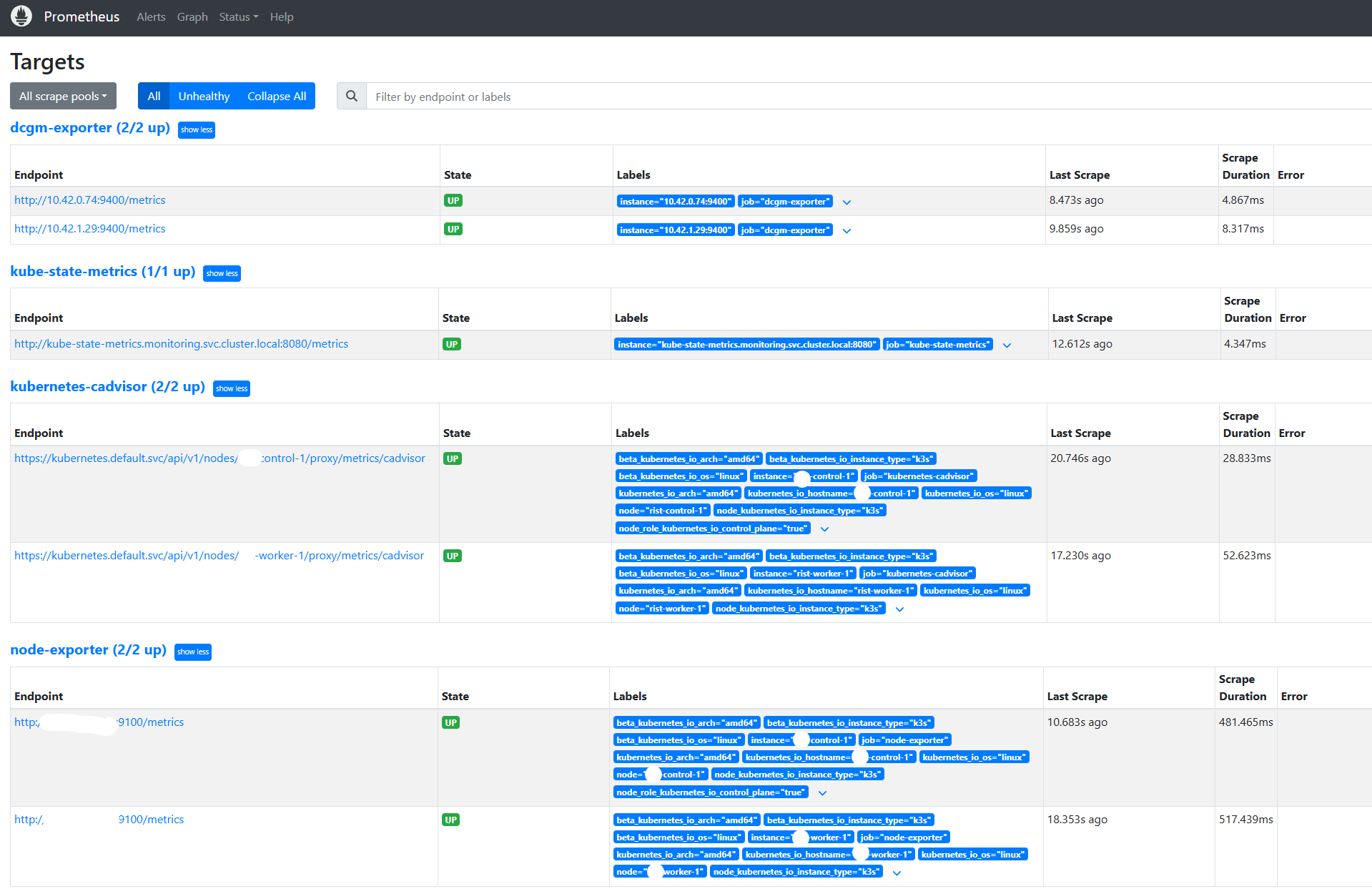
프로메테우스에서 Target이 정상적으로 동작하는지 확인해보았다.
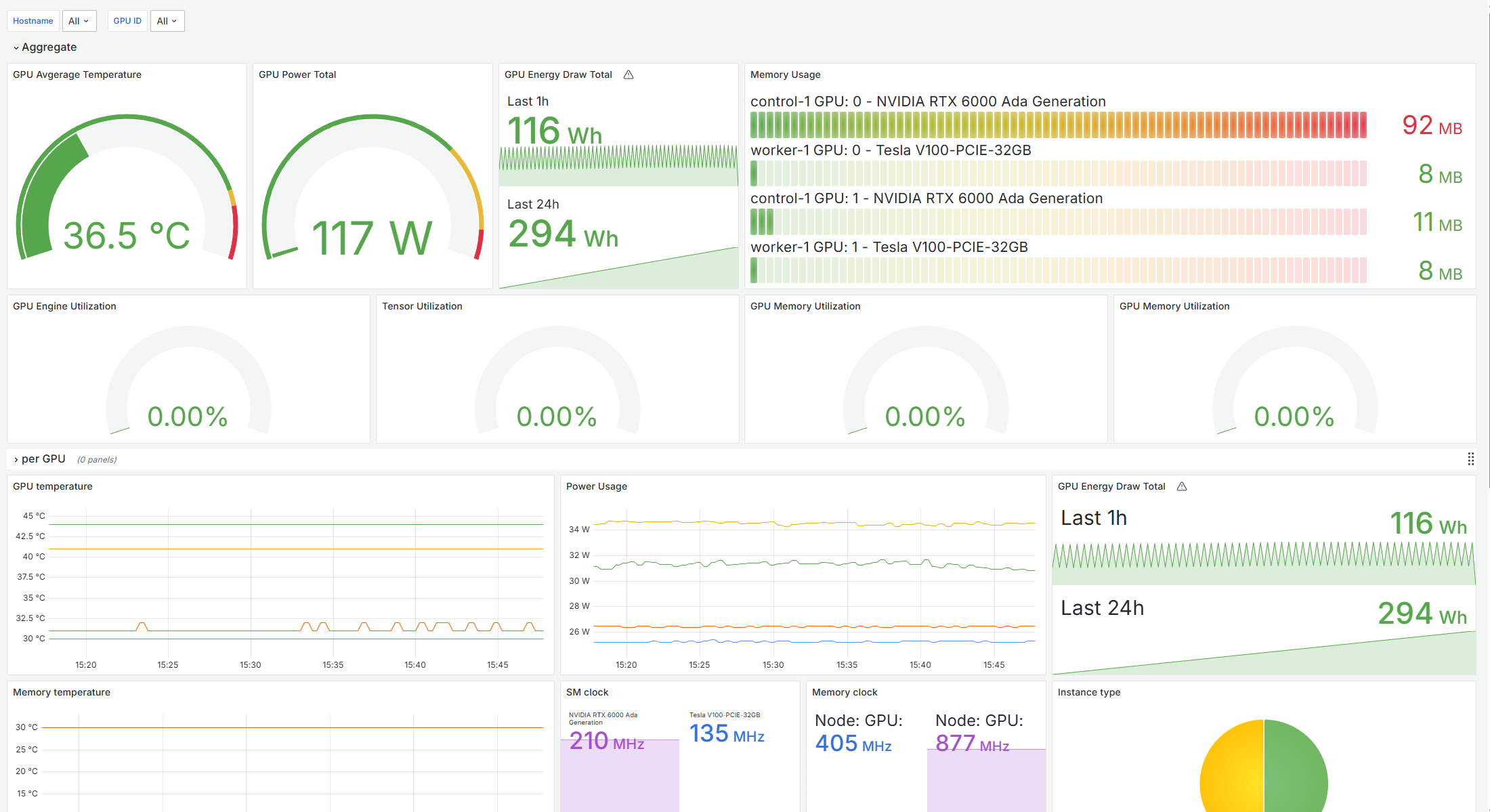
Grafana에서 Dashboard를 하나 골라서 설정해보았다.
스터디 목적으로 Helm을 안쓰고 문서랑 AI 도움을 받아 YAML 매니페스트를 만들긴 했는데...
이걸 쓰면서 왜 Helm을 쓰는지 조금 알 것 같다는 생각이 들었다.
문제점으로 모니터링 스택에 따로 볼륨을 할당하지 않아서 데이터가 지워지는 문제가 있는데, 나중에 NFS랑 PVC 스터디 하면서 설정해보기로 한다.
'dev' 카테고리의 다른 글
| [Kubernetes] k3s에서 NVIDIA GPU 사용 환경 만들기 (1) | 2026.03.27 |
|---|---|
| [Kubernetes] k3s로 멀티노드 클러스터 구축하기 (0) | 2026.03.26 |
| [Linux] Ubuntu 24.04 NVIDIA 드라이버 + CUDA + cuDNN 설치하기 (0) | 2025.03.05 |
| YOLOv12: Attention-Centric Real-Time Object Detectors (0) | 2025.03.04 |
| [Jetson] Jetson Orin Nano GPIO 에러 Exception: Could not determine Jetson model 해결 (0) | 2025.01.20 |
